

Following the launch of SnowCloud 4.5, this update brings additional capabilities and refinements across rental operations, access control, Mountain Sports School, point of sale, and the online guest experience.
Highlights include early rental pickup, improved equipment tracking across rental locations, clearer access-scan information, more flexible lesson management, and expanded pricing controls. Additional improvements to inventory, accounting, and guest management help resort teams handle more of their daily operations within SnowCloud.
Rentals
This release gives rental teams more flexibility to prepare guests, track equipment across locations, and manage changes to existing reservations.
New Features
- Early Rental Pickup: Rental shops can now allow guests to pick up equipment before their scheduled rental date. Administrators can configure an early pickup window for each shop, with item-level overrides when needed. Equipment can be issued the afternoon or evening before a reservation begins without consuming a rental day or changing the original reservation dates. Staff can also reverse an early checkout when necessary. This helps resorts prepare arriving guests and reduce congestion during the morning rush.
- Rental Shop Inventory Management: Expanded rental shop controls help resorts track equipment across multiple locations. New operational views identify late rentals and equipment currently visiting another shop. Staff can transfer equipment between locations or update its designated home shop in bulk. Additional settings support pickup-location restrictions and different handling for daily versus consecutive-day rentals.
Improvements
- More Information During Equipment Returns: When staff scan equipment directly from the rental check-in screen, SnowCloud now displays information about the original rental, including purchased add-ons such as damage insurance. Technicians can verify the equipment’s coverage and rental details without first searching for the guest or opening the original sale.
- Rental Package Add-ons: Rental Profiles now display add-ons associated with each package, including equipment protection and additional rental items. This gives technicians better visibility into everything included in a guest’s reservation during fulfillment and returns.
- Multi-Day Rental Upgrades & Exchanges: Improved upgrade and exchange handling accounts for all associated sale records when changing an extended or multi-day rental. Applicable price adjustments and credits are calculated across the full rental, while add-on equipment remains associated with the correct package and guest.
- Rental Fitting Calculator: The ski fitting calculator now retains the selected height when staff enter or change a guest’s age, while continuing to update the recommended ski length. Skier-type selections also display their complete descriptions, making it easier to review the appropriate settings.
- Rental Interface Refinements: Updated rental forms, dialogs, product recommendations, and navigation elements provide a more consistent experience throughout equipment fulfillment.
Access Control & Scanning
Improvements
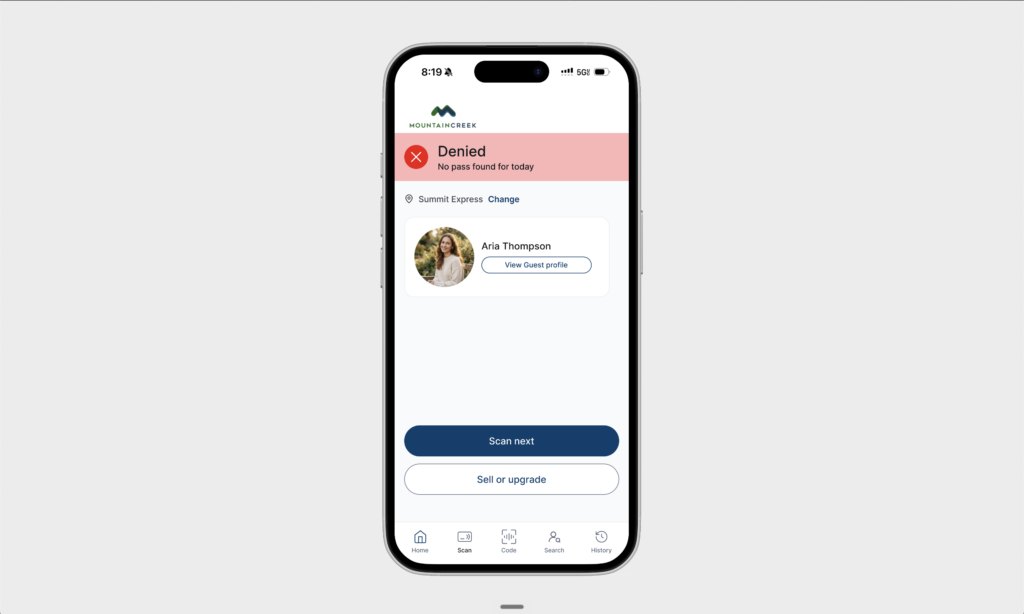
- More Informative Access Scan Results: When a guest’s media is rejected, SnowCloud provides more specific information about why access was denied. Scan results can now distinguish between unknown media, missing valid products, expired entitlements, products that are not yet valid, and products that are not valid at the scanning location. Where available, results also include the associated product and age classification. These improvements extend to supported SKIDATA scanning workflows and Ops Center, helping teams resolve access issues more quickly.
- Guest Lookup by RFID: Guest services teams can search for a guest using an RFID chip number directly from Guest Lookup. A dedicated RFID search field makes it easier to locate the correct guest record when investigating an access issue or assisting someone who already has their media.
- Ikon Pass Guest Information: Improvements to the Ikon Pass integration allow SnowCloud to process available guest information through background synchronization. Supported profile details include name, date of birth, ZIP code, email address, media identifiers, and guest photos, providing more complete guest records for supported access workflows.
Mountain Sports School
This update expands the tools available to instructors, supervisors, and school administrators for managing reservations, schedules, participant progress, and payroll.
Improvements
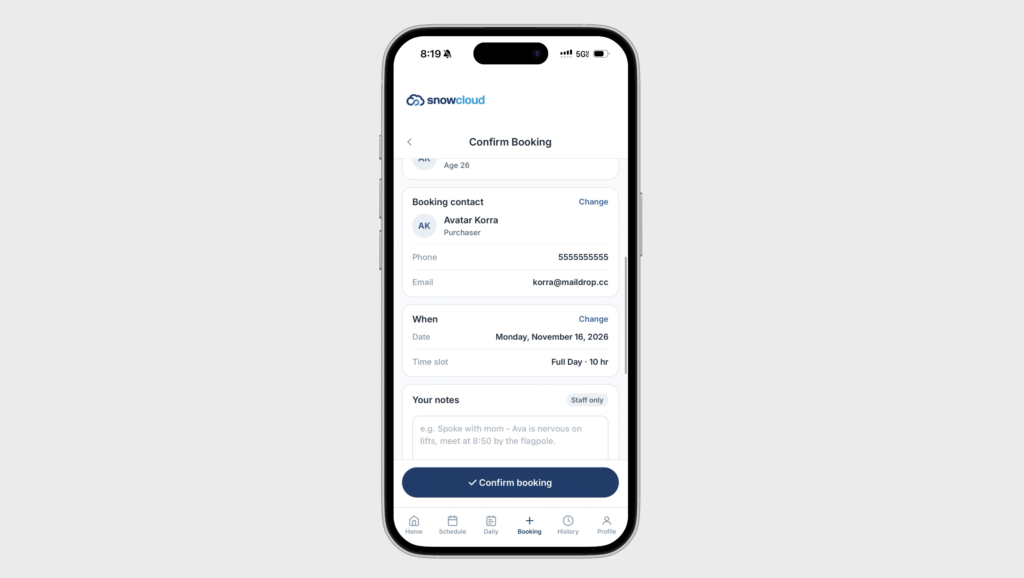
- Instructor-Managed Private Bookings: Instructor-created private lesson reservations now require purchaser contact information, including a valid email address and phone number. This helps ensure that school teams can communicate with guests about lesson details, meeting locations, and schedule changes.
- More Flexible Lesson Cancellations: For eligible multi-day lesson bookings, staff can cancel individual days without canceling the entire reservation. Applicable refunds are processed through the corresponding folio or account funds, and guests receive a cancellation email.
- Improved Scheduling & Attendance: School supervisors can filter instructors and students by operating zone, making it easier to focus on a particular location. Expanded class visibility supports reviewing enrolled students, identifying arrivals, and checking participants in directly from schedule rows. Classes led by an instructor can also appear on their schedule when no students have enrolled yet.
- Program-Based Report Cards: Report cards now support program-specific configurations, including a default report card for each lesson product. Instructors can select the appropriate program for an individual lesson and record participant progress using percentage-based tracking. Additional refinements support check-in and check-out workflows for applicable programs.
- Instructor Pay Approvals: School administrators can approve an entire team’s day through a single action, reducing repetitive payroll review. A Primary Job designation also supports setting an instructor’s home base and operating zone.
- Class-Specific Email Instructions: Administrators can configure instructions for individual classes and include them in lesson confirmation emails. Formatted instructions allow schools to communicate class-specific meeting locations, preparation details, and other important information before guests arrive.
- Lesson Series Staffing: Instructor assignments within lesson series are now organized by time slot, with overlapping assignments identified more clearly. This helps scheduling teams spot potential conflicts before finalizing staffing.
SnowCloud Operator App & Point of Sale
Improvements
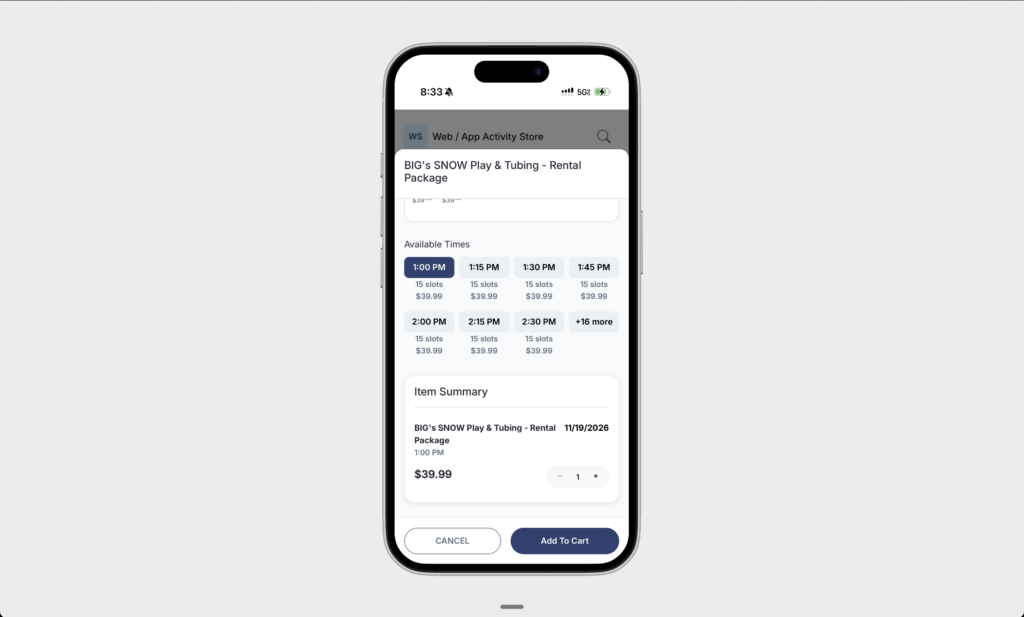
- Clearer Time Slot Selection: Available times for activities, rentals, and other time-based products now appear in a more organized grid. The selected time is visibly highlighted and displayed in the product summary. When an activity offers additional times, staff can expand the list using a “+N more” control. The selected time remains visible when moving between dates.
- Kitchen Display System Coursing: Improvements to food and beverage coursing allow staff to fire courses directly to the Kitchen Display System without refreshing the tab. Course information remains synchronized with the order, supporting more reliable communication between service teams and the kitchen.
- Improved Photo Uploads: Photo uploads now use the device’s native image picker, providing a more familiar experience when adding guest or operational images. Expanded image-format support and clearer error messages help staff complete uploads more reliably.
- Payment Method Configuration: Updated payment settings preserve credit-card acceptance for shops and address configuration issues that could prevent manual card entry from appearing as expected in supported POS workflows.
SnowCloud Shop & Guest Accounts
New Features
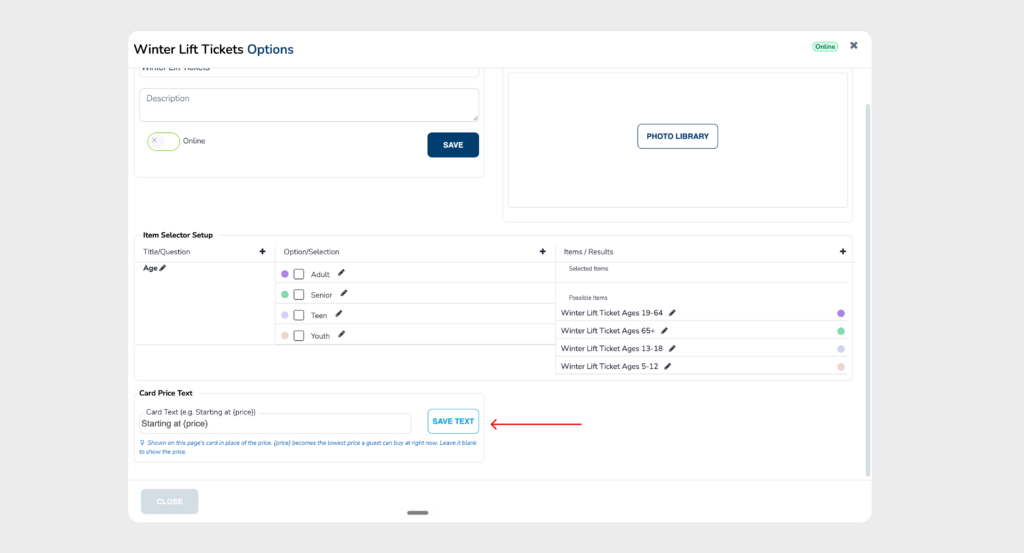
- Expanded Price Display Controls: Resorts have more control over how product prices are presented in SnowCloud Shop. Administrators can configure account-level defaults and shop-specific settings to display today’s price, a “Starting at” price, or no price on applicable product cards. Additional options include comparison pricing, percentage-off savings, “You Save” messaging, and custom price text. These settings give resorts more flexibility to communicate dynamic pricing and promotional offers.
- Mountain Collective Account Linking: Eligible Mountain Collective passholders can link their pass information to their SnowCloud guest profile, helping resorts associate existing passholder records with the appropriate guest accounts.
Improvements
- Accurate Cart Pricing: Improvements to group pricing and stacked discounts ensure that the correct calculated price appears when a product is added to the cart. Guests receive more consistent pricing information as they build their purchase.
- Simplified Guest Waiver Signing: Guests completing a waiver through a QR code can now review the waiver, enter required contact information, and sign from a single page. When multiple waivers are required for a guest and their dependents, contact information can carry forward between forms. A completion confirmation clearly indicates when the signing process is finished.
- Outstanding Lesson Waivers: Guests who add a payment card before a lesson can now see any outstanding waivers that still require a signature, helping them complete required steps before arriving.
Reliability & Quality Improvements
- Duplicate Account Prevention: Account registration now checks for email addresses already associated with active or merged guest records, preventing the creation of additional accounts using an existing email.
- Receipt Reliability: Fixed an issue that could prevent receipts from loading for certain orders that did not include add-on products.
SnowCloud Portal & Inventory Management
Improvements
- Multi-Day Reservation Management: Multi-day products are displayed more consistently as a single purchase within the order overview, while retaining their individual inventory dates. Staff can use Bulk Modify to move all associated dates together rather than changing each day individually. SnowCloud validates inventory availability across every date in the revised reservation before saving. Date changes through this workflow retain the original purchase price; changes requiring a price adjustment can be handled through the supported exchange workflow.
- Inventory Pool Schedule Management: When removing an inventory pool schedule or item, administrators can review the affected dates and identify dates with existing sales before confirming the change. Options for removing an individual occurrence or an entire series provide greater flexibility when adjusting availability.
Accounting, House Accounts & SnowPay
New Features
- Cancel Outstanding House Account Payment Requests: Authorized staff can cancel a House Account payment request that has been sent but remains unpaid. Once canceled, the original payment link can no longer be used, while the underlying House Account balance and transaction history remain intact. This allows accounting teams to correct billing mistakes or issue a replacement request without modifying the amount owed.
Improvements
- Expanded Deferred Revenue GL Configuration: Deferred-revenue item classes now support additional GL account configuration for discounts, taxes, and fees. These settings give accounting teams more control over how deferred amounts are classified and recognized, including scenarios involving contra-revenue discounts and taxes recognized on future inventory dates.
- SnowPay Dashboard Navigation: Corrected links for dispute and fraud-related information, improving access to payment management tools within the dashboard.
This release continues to refine the connected workflows introduced in SnowCloud 4.5, giving resort teams more control over rentals, guest service, school operations, and financial management throughout the platform.
